
Kaptan Ecosystem · Appointment Management
Captain's BookKaptan DefteriFrom booking request to reminder: appointment management for clinics and practitioner businesses
Your customers leave an appointment request on your website; your team manages the calendar, clients, session packages and email/SMS notifications from one panel. 10 modules, a Turkish and English customer site, fully in the cloud.
Product video
Watch Captain’s Book at work
From a booking request left on the website to the calendar, from a session package to the reminder notification: all ten modules in six and a half minutes, on real panel and customer-site screens.
 K²
The video is in Turkish; English subtitles can be enabled from the player. Screens were recorded with synthetic sample data.
Watch chapter by chapter
Experience Captain's Bridge with your own workflows
Schedule a live walkthrough of this module with our team or pick a package and try it free for 14 days.
Screen Preview
Customer site and admin panel, one product
A visitor leaves a request on your site, your team reviews it in the panel, books it into the calendar, and reminders go out on their own. The screens below are the product's real interface; all data is sample data.
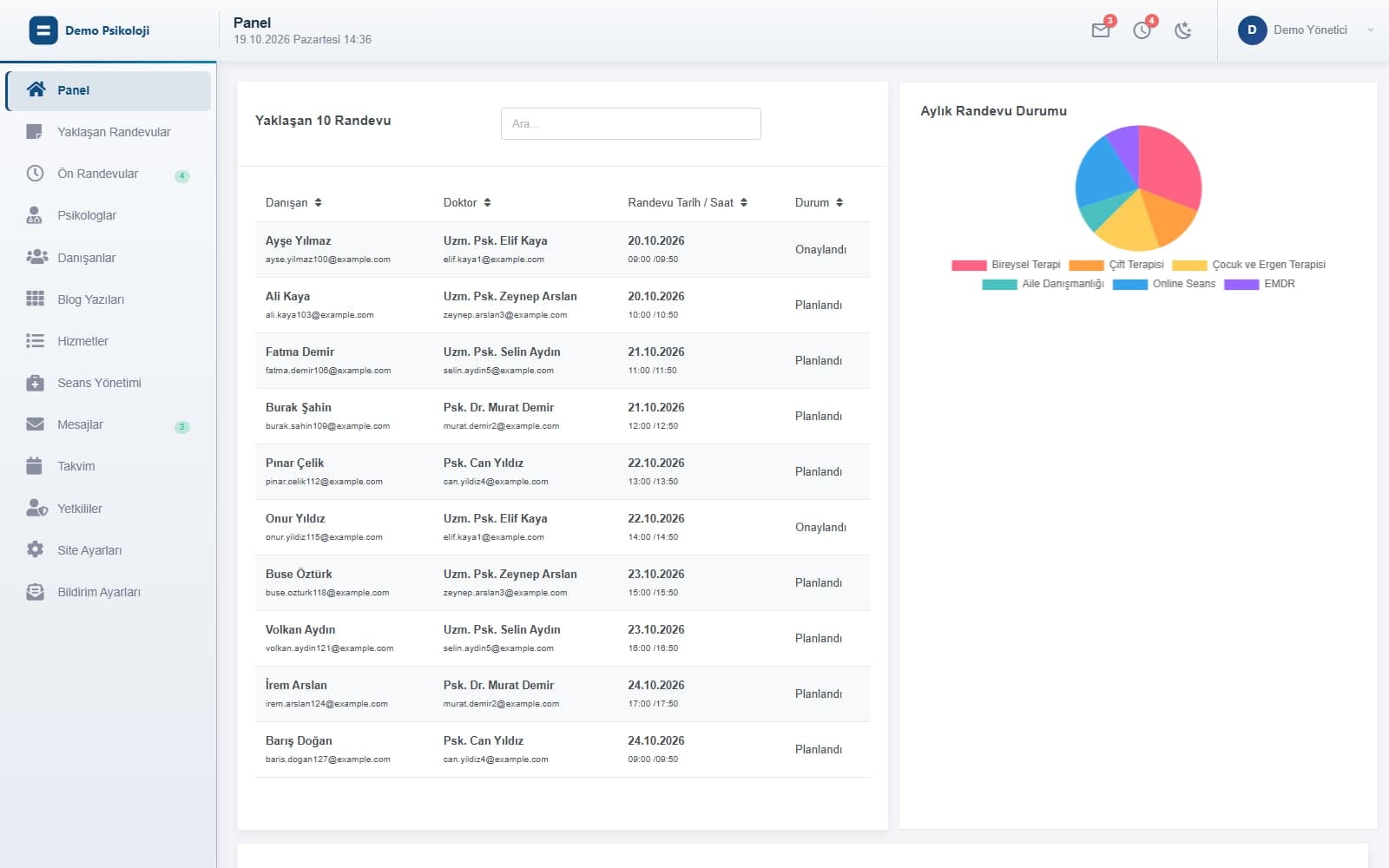
Where the day starts: the next ten appointments, the monthly appointment split by therapy type and pending booking requests at a glance.
Two faces, one data set
Your customers see the site, your team sees the panel
Captain's Book has three parts: the customer site published under your brand, the admin panel your team works in, and the cloud API that feeds both. A request left on the site appears in the panel within seconds; a session entered in the panel shows up in the client's account at the same moment.
Customer website
Home, about, team, services, blog, contact and the appointment request form, in Turkish and English. Logo, color palette and contact details are managed from the panel.
Admin panel
Calendar, booking requests, practitioners, clients, session packages, messages, notification templates and site settings. Admin and practitioner accounts sign in to the same panel with their own permissions.
Client account
Clients sign in on the site; on My Appointments they see their sessions, pick suitable days when date selection is left to them, and pay a pending package by card with 3D Secure.
Cloud infrastructure
Node.js (Express) API and a PostgreSQL (Supabase) database; email SMTP, SMS provider and virtual POS integrations run server-side, so keys never reach the browser.
Modules
A module for every step of an appointment business
Each card maps to a menu item in the panel or a flow on the customer site. The detail pages list the capabilities and show screens captured with sample data.
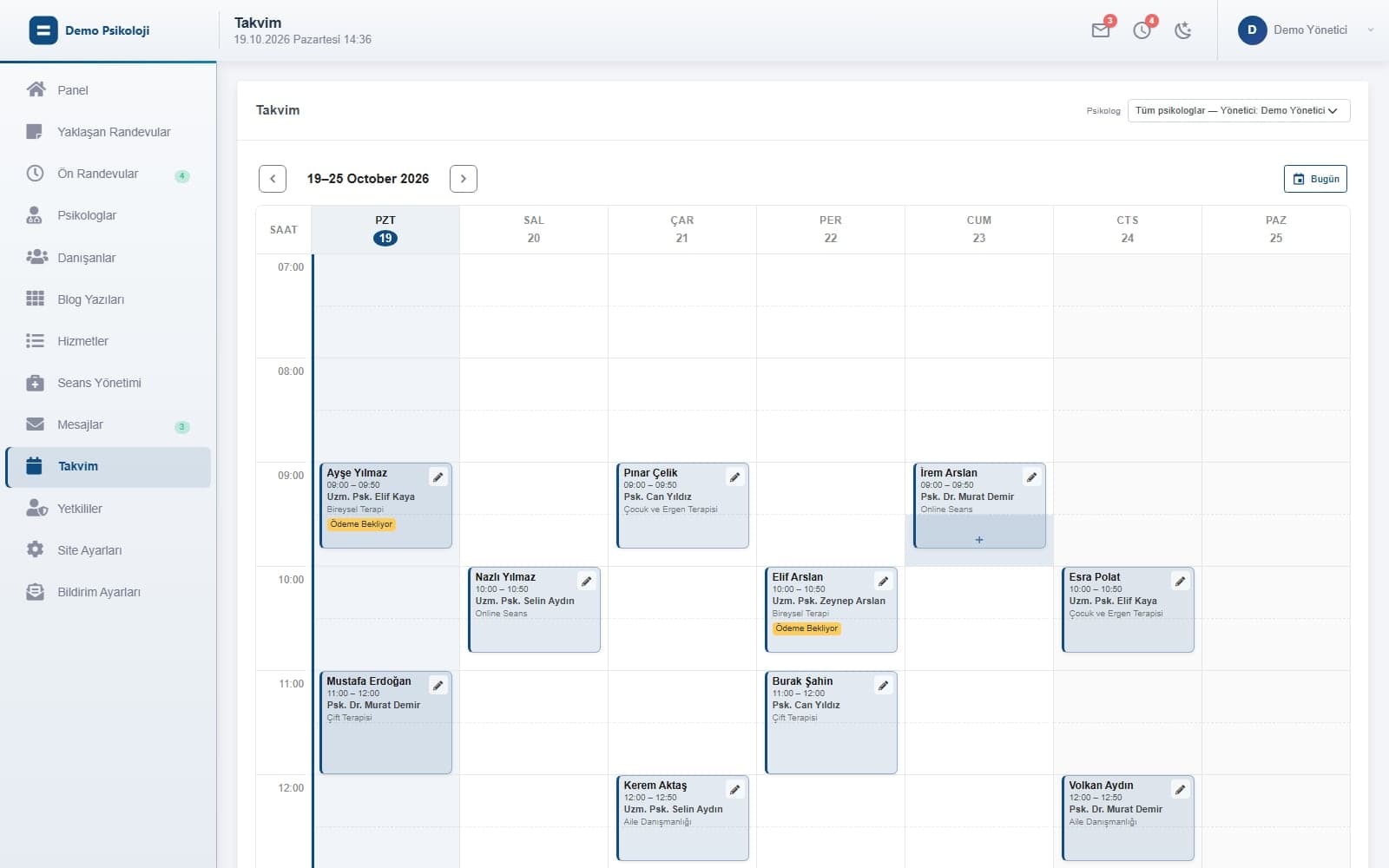
Calendar and Appointments
Every practitioner's sessions in a weekly calendar; new sessions, edits, notifications and conversion to recurring sessions. Upcoming appointments list and dashboard summary.
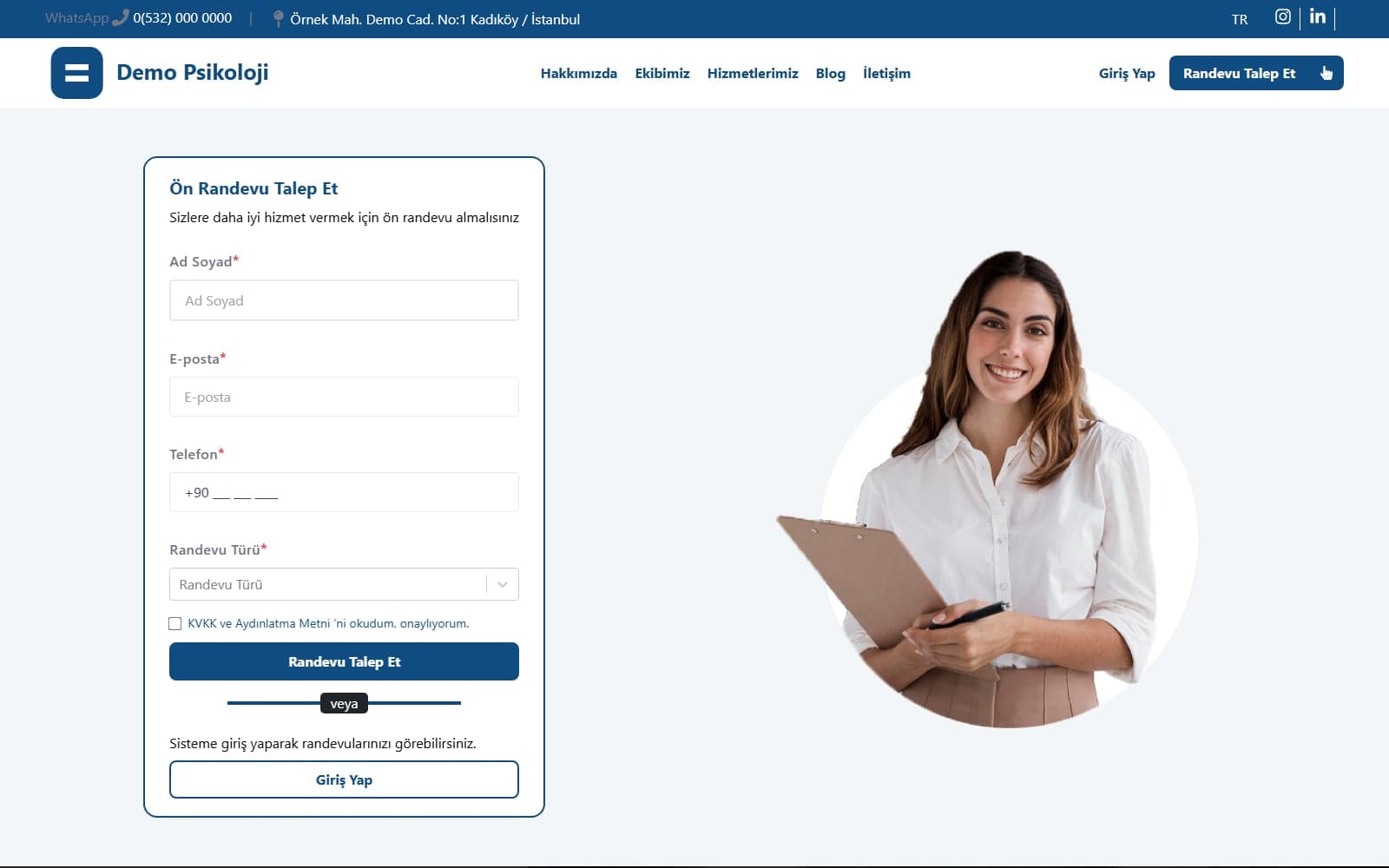
Online Booking Requests
Requests from the site form become pre-appointments in the panel; pick practitioner, therapy type, package and schedule to create the client record and session plan in one click.
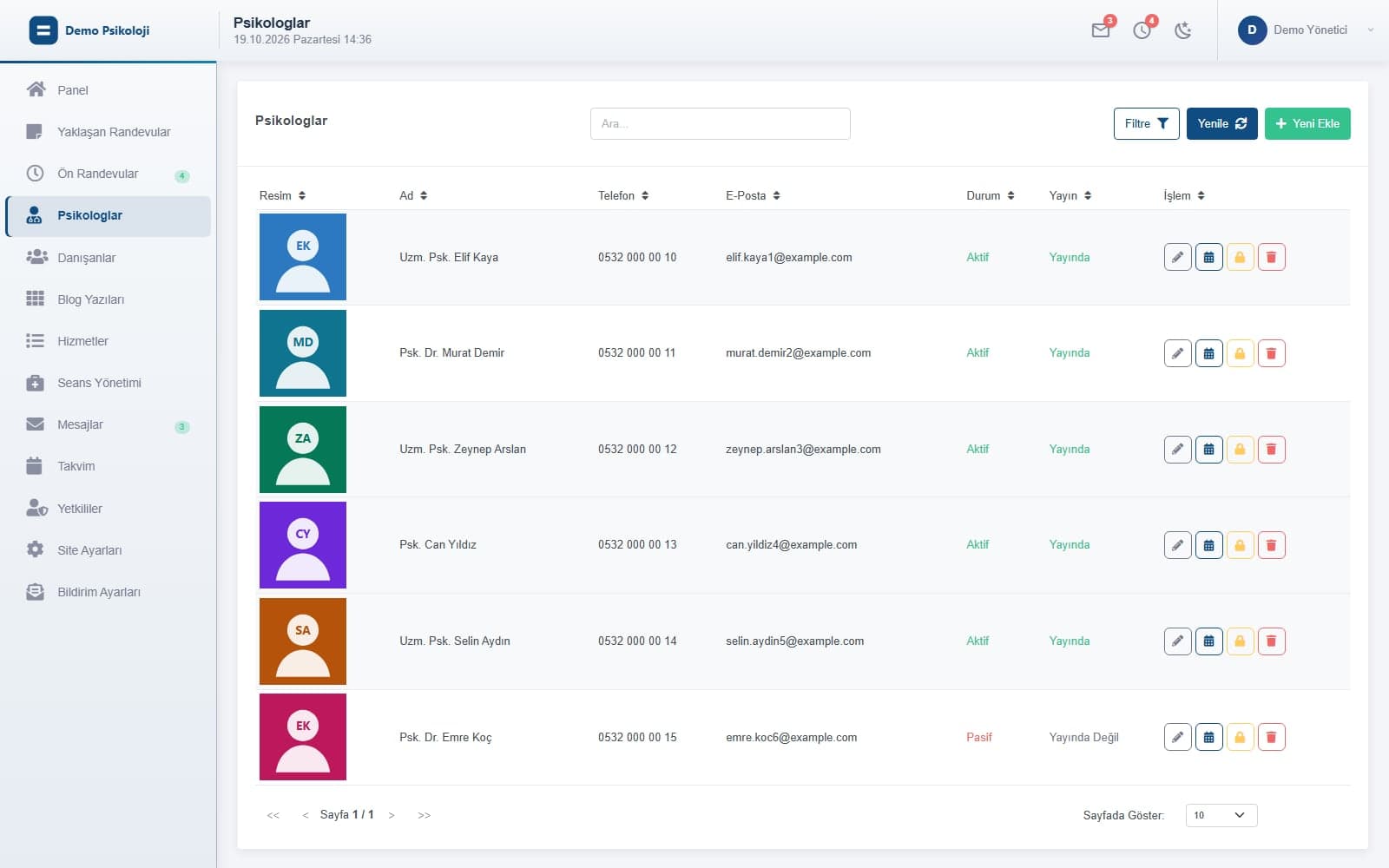
Practitioner Management
Practitioner profiles, TR/EN title and bio, publish status, their own panel account and calendar; transfer a departing practitioner's clients.
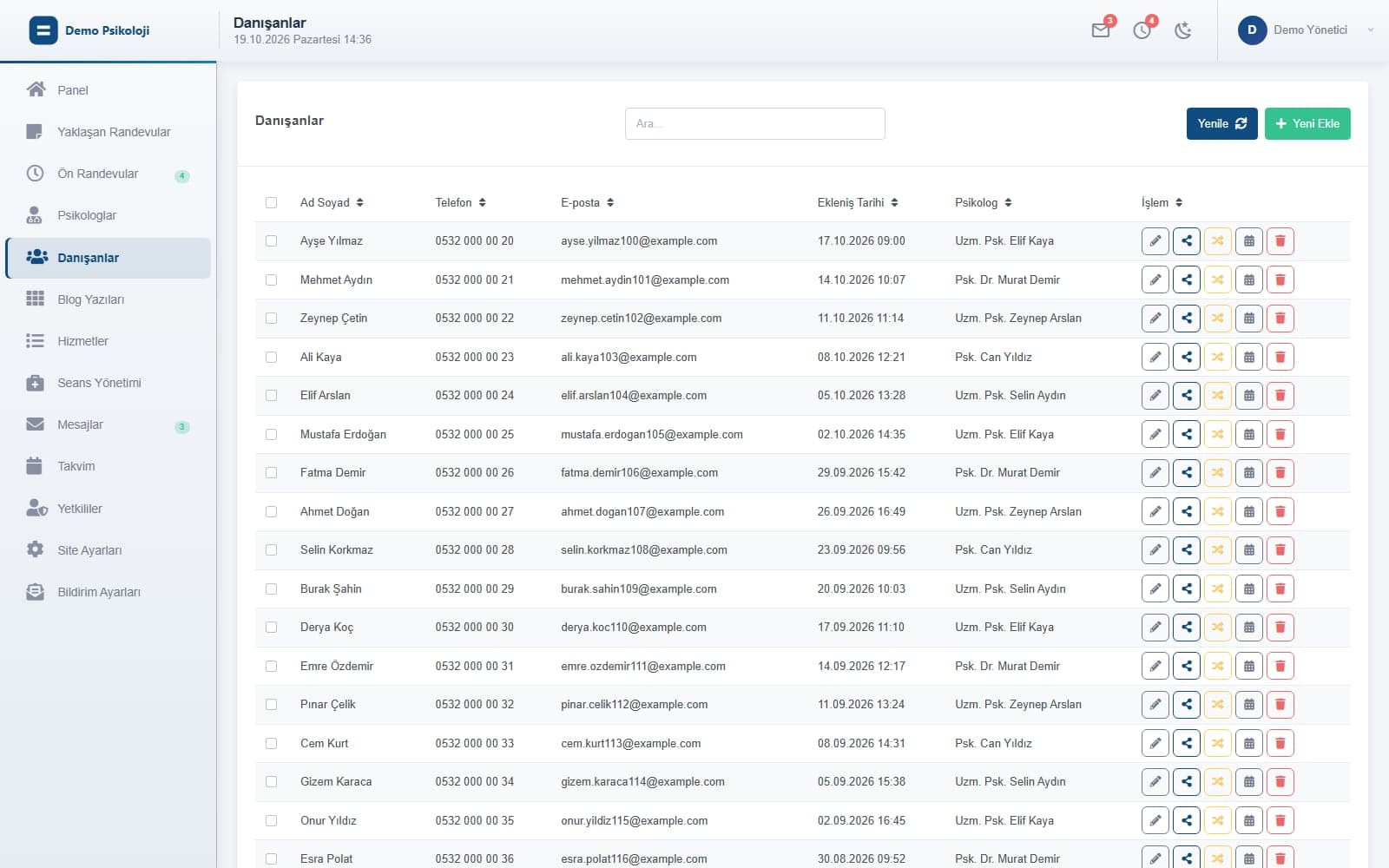
Client Management
Client record, responsible practitioner, appointment history; sharing and transferring between practitioners, bulk actions, the client's site account.
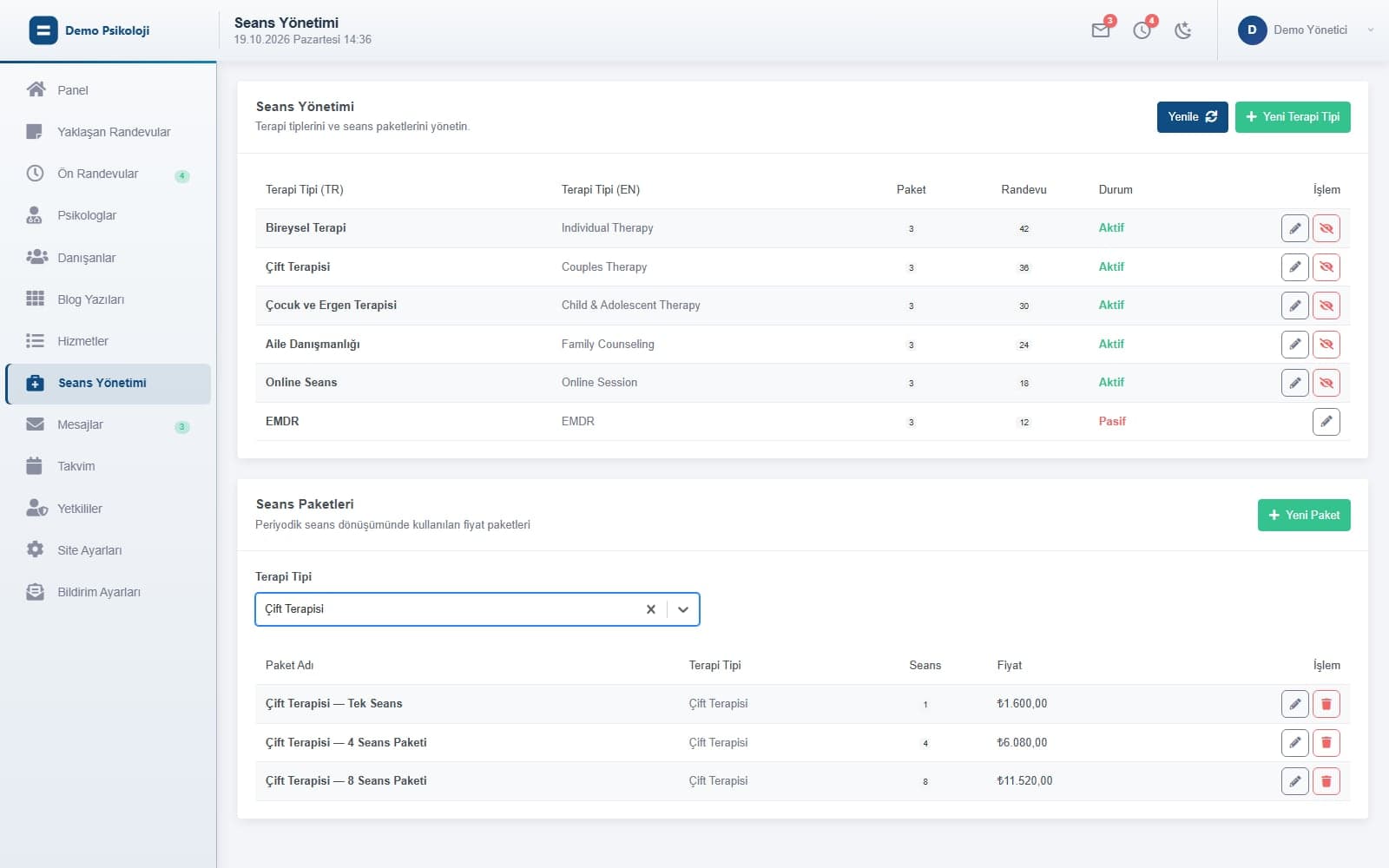
Session Packages and Payment
Therapy types and session packages (session count, price); package selection on booking requests, payment status tracking and the client's 3D Secure card payment on the site.
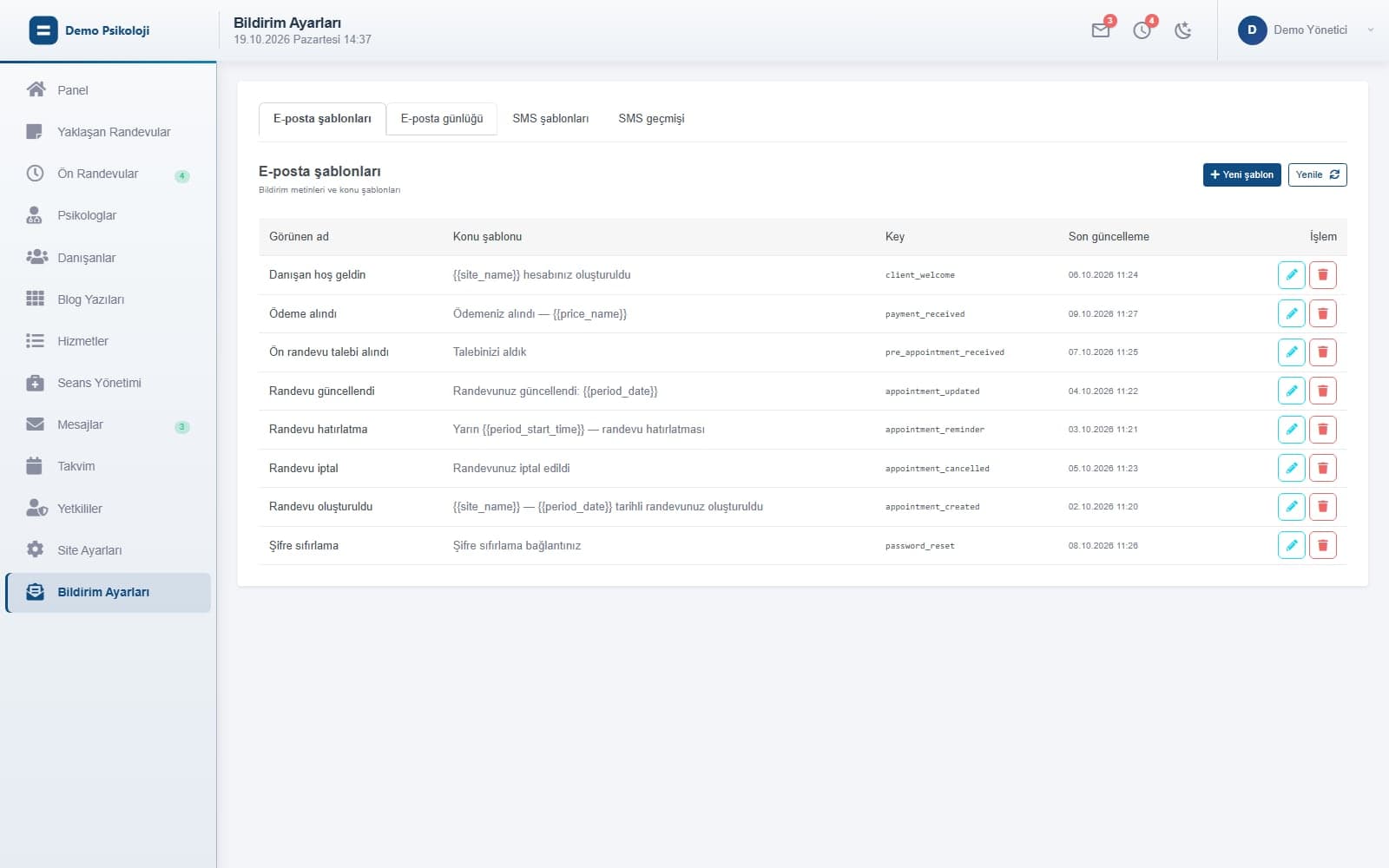
Email and SMS Notifications
Booking, reminder, cancellation, welcome and password emails plus SMS; editable templates, variables and a delivery log.
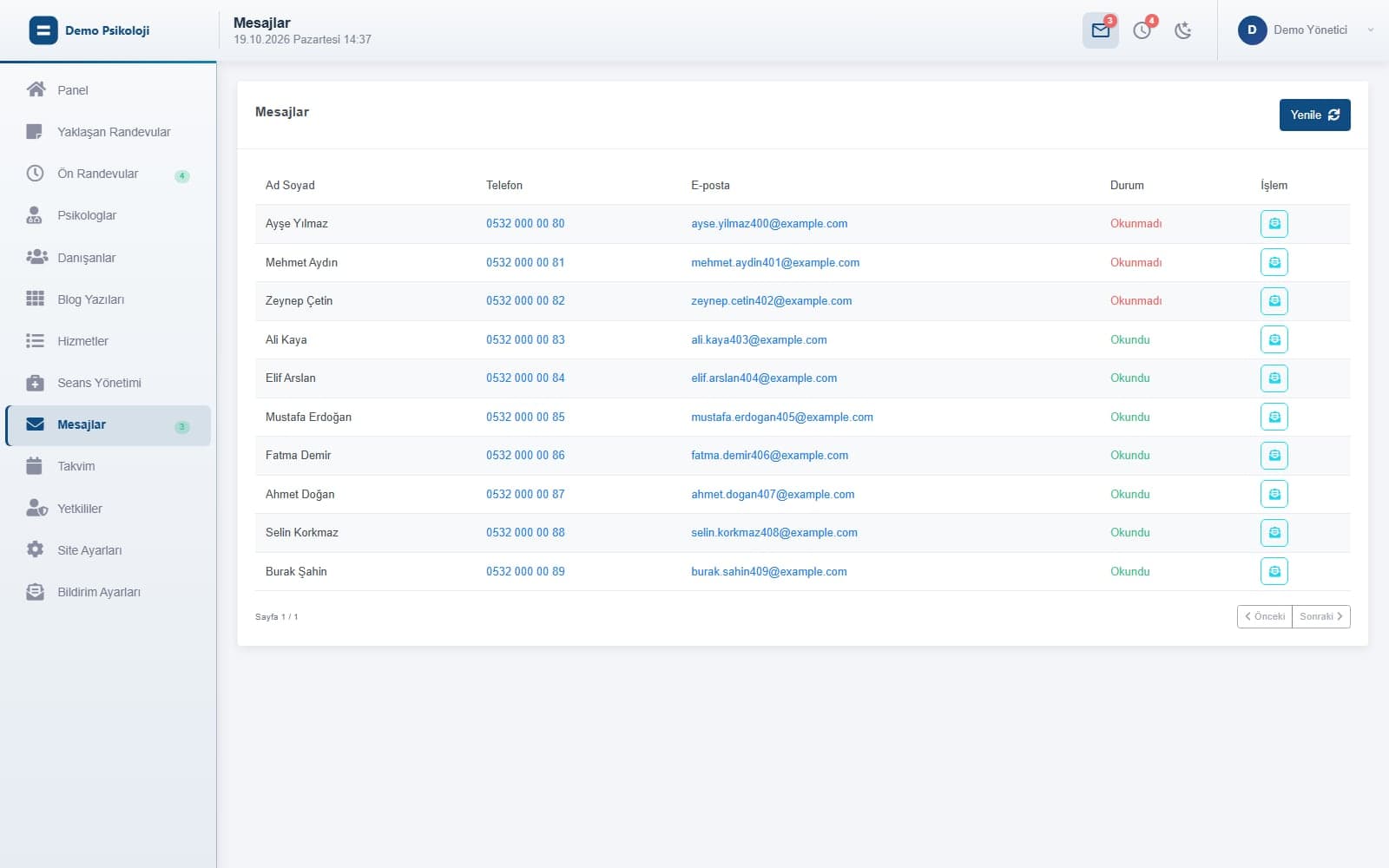
Messages
Messages from the site's contact form in the panel; unread counter in the top bar and menu, sender details in the message view.
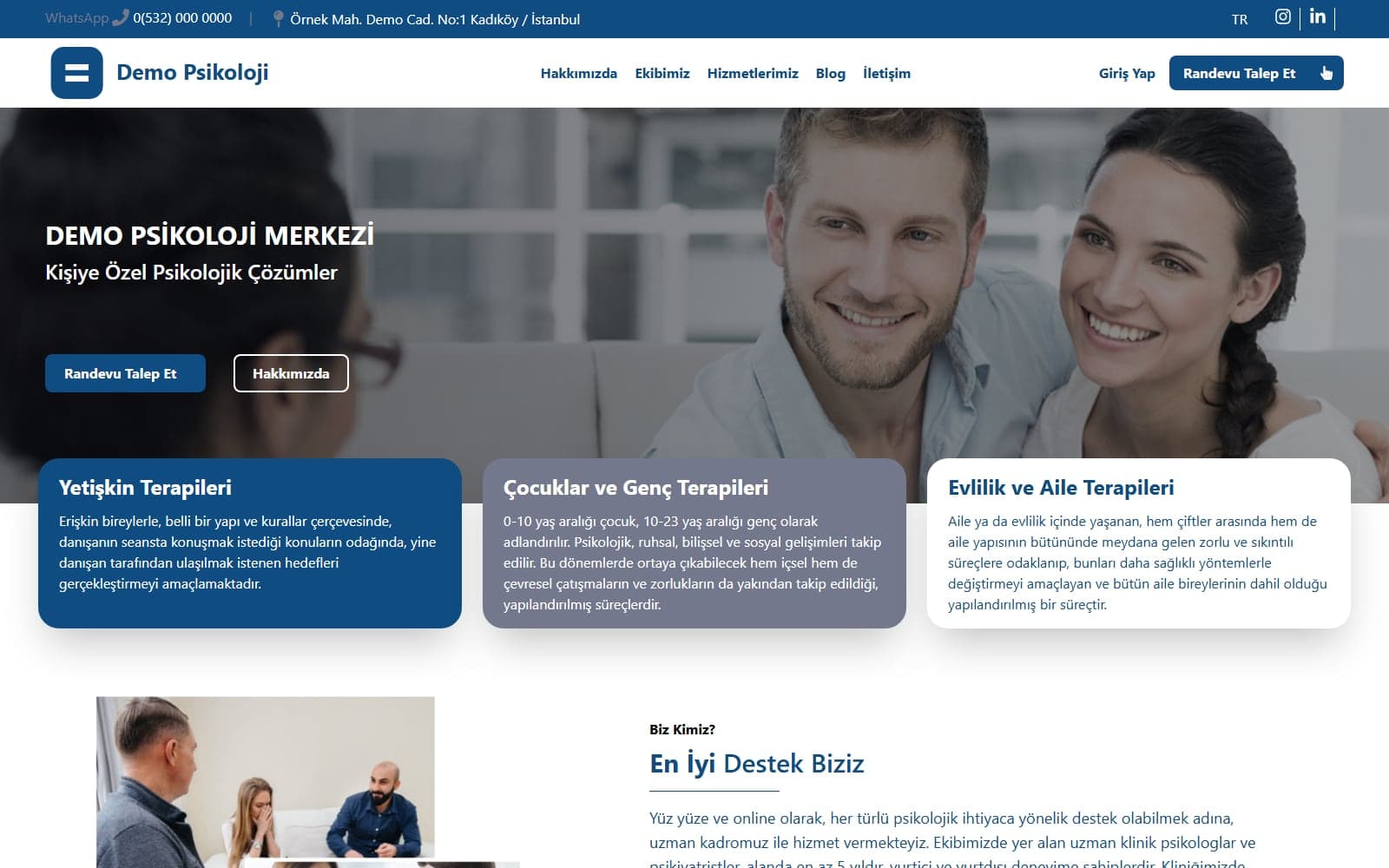
Customer Website
Your own SEO-ready site in Turkish and English: services, team, blog, contact and booking form. Service and blog content is managed from the panel.
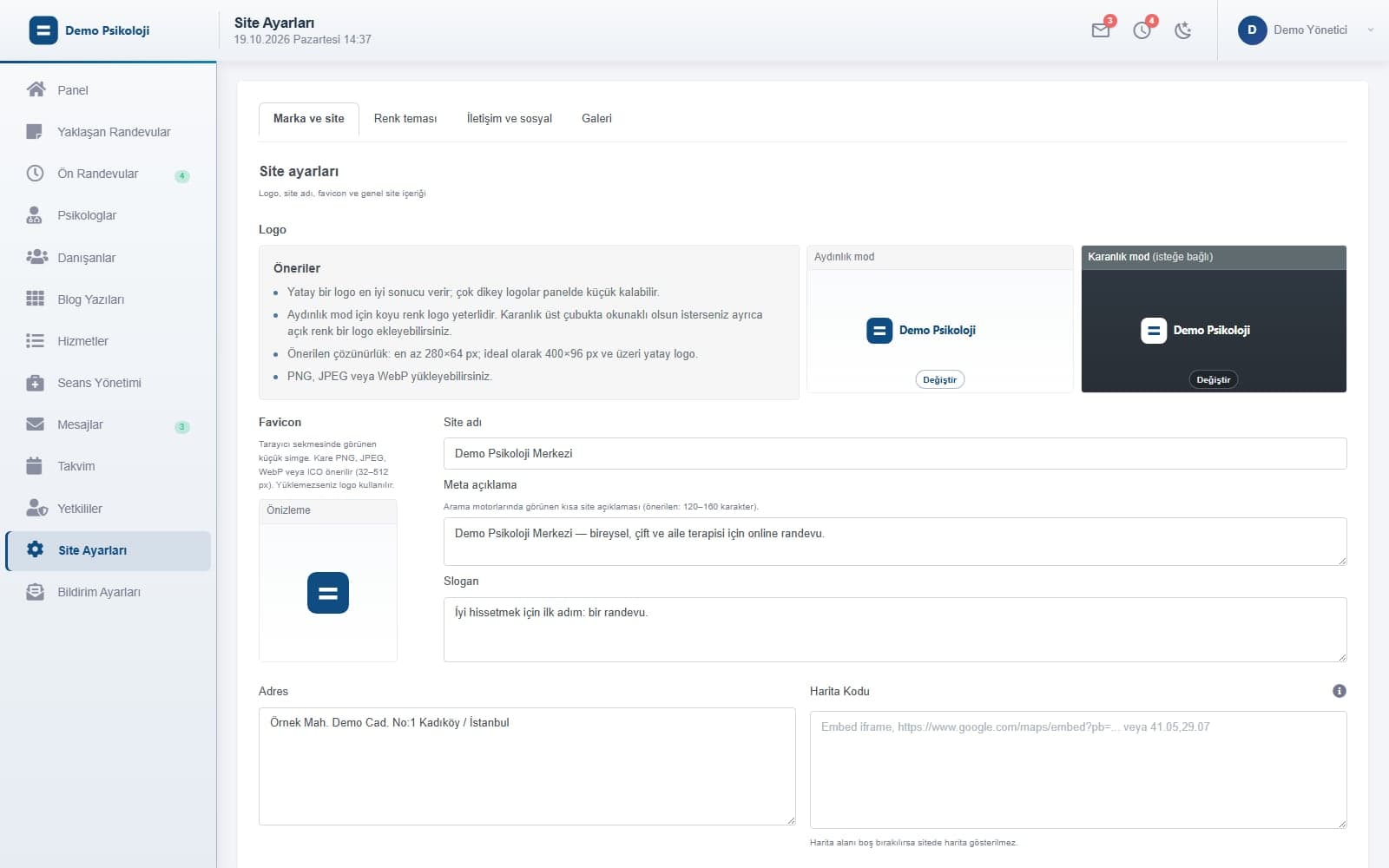
Brand and Color Theme
Logo, favicon, site name, meta description, slogan, address, map and social links; preset palettes or custom colors for both the site and the panel.
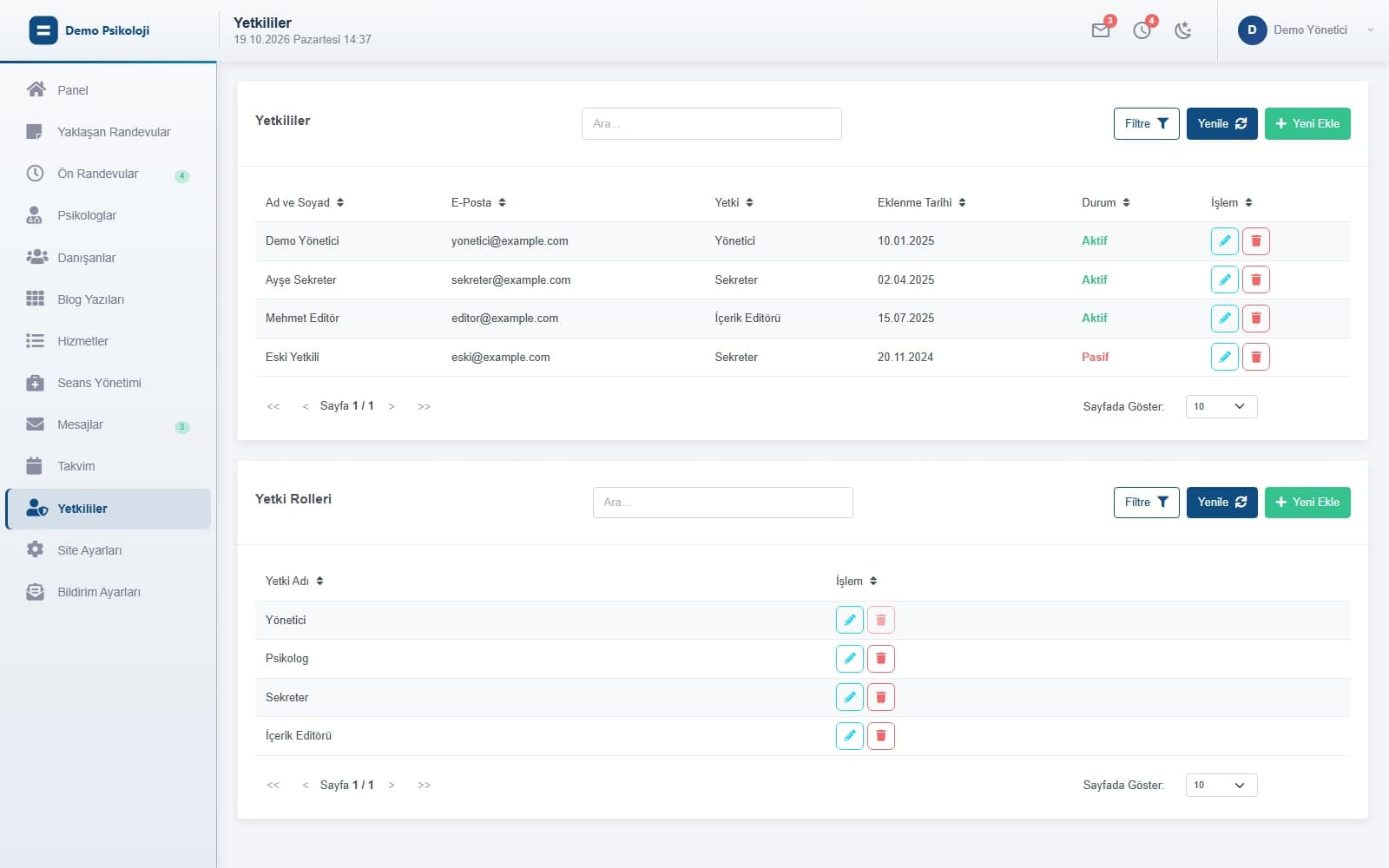
Users and Roles
Admin, receptionist and practitioner accounts; menu-based roles, password setup by invitation email, email verification and secure sessions.
Screens are captured from the product's real interface using entirely synthetic sample data; no customer data was used. The application UI shown is Turkish.
Workflow
Five steps from request to reminder
A typical day with Captain's Book: a visitor fills in the form, your team reviews it, the plan goes into the calendar, payment is taken, the reminder goes out.
- 01
Request
The visitor fills in the Request an Appointment form on the site; a 'We received your request' email goes out automatically and the panel counter rises.
- 02
Review
Your team opens the request under Booking Requests and picks the practitioner and therapy type, or just leaves a note.
- 03
Scheduling
Package and schedule are chosen; the system creates the client record and writes the sessions to the calendar, or leaves date selection to the client.
- 04
Payment
Payment taken in person is marked as received; otherwise the client settles the package on the site with a 3D Secure card payment.
- 05
Reminder
Booking and reminder email/SMS go out from the templates; every delivery and its result is recorded in the log.
Who is it for?
Every practitioner business that runs on appointments
The interface was designed for psychological counseling centers (practitioner, client, therapy type, session); the same structure adapts to other businesses that work with appointments, practitioners and packages.
- 01Psychological counseling and therapy centers
- 02Clinics, polyclinics and dental practices
- 03Physiotherapy, dietitian and coaching offices
- 04Consultancies working with several practitioners
- 05Practitioners and teams offering online sessions
- 06Course and training centers selling session packages
Pricing
One package, two products: Captain's Book + Kaptan Köşkü
The Captain's Book package has a single per-organization price; setup, domain connection, your logo and colors, email/SMS provider and virtual POS configuration are done together.
- 5 users included — shared between Captain's Book and Kaptan Köşkü
- 10 practitioner portal licenses included
- Kaptan Köşkü ERP scope + Session module
- Extra user ₺1.790 / month; extra practitioners from the portal seat list
Captain's Book
Annual billing ₺95.000 / year (2 months free)
Extra-user volume discounts, extra practitioner seat packs and the comparison with Kaptan Köşkü plans are on the Pricing page.
Captain's Book
Appointment solution for clinics and practitioner businesses
Captain's Book appointment, client and session management together with the Kaptan Köşkü Business Management Platform scope (pre-accounting, e-transformation, CRM, general ledger) at a single price; user seats are shared across both products.
Captain's Book
Appointments, clients, session packages and customer site + Kaptan Köşkü Business Management Platform scope
- 5 users included (shared between Captain's Book and Kaptan Köşkü)
- 10 practitioner portal licenses included
- Kaptan Köşkü Business Management Platform scope + Session module
Included in the price
- Calendar and online appointment requests from the website
- Client card and session packages
- Email / SMS reminders and messages
- Turkish and English customer site, brand and theme
- Practitioner portal (with the included practitioner licenses)
- Kaptan Köşkü Business Management Platform scope: pre-accounting, e-transformation, CRM, general ledger and more
- Session module (Kaptan Köşkü)
- User seats shared across both products
Extra user
₺1.790 / user / month
A shared seat in Captain's Book and Kaptan Köşkü. The volume discount of the tier reached applies to all extra users.
Extra practitioner
A portal seat for each practitioner beyond the included licenses, purchased at the Portal User Packs list price.
- Portal Users 5-Pack₺ 612,5 / package / month
- Portal Users 10-Pack₺ 1.225 / package / month
- Portal Users 20-Pack₺ 2.450 / package / month
- Portal Users 50-Pack₺ 6.125 / package / month
FAQ
Frequently asked questions
Do visitors pick the appointment themselves?
There are two ways. The visitor leaves a request through the site form and your team sets the practitioner, package and dates in the panel. Or you leave date selection to the client: they sign in on the site, see the practitioner's busy slots, pick suitable days, and the sessions go into the calendar on confirmation.
How are reminders sent?
Email goes through your SMTP server and SMS through your SMS provider; both are configured during setup. You edit the templates in the panel, and every delivery is logged with recipient, template and result.
Is there online payment?
Yes. The client pays a pending session package from their site account by card through a 3D Secure virtual POS; the result is recorded in the panel and the 'Awaiting Payment' badge in the calendar clears. Virtual POS keys are kept only on the server.
Can I work with several practitioners?
Yes. Each practitioner has their own profile, panel account and calendar. Admins see all calendars; practitioners work in their own calendar and clients, and clients can be shared and transferred between practitioners.
Can I keep my existing website?
Captain's Book ships with its own customer site: services, team, blog, contact and booking form are ready, and logo, colors and content are managed from the panel. If you already have a site, you can start by linking to the booking form.
Where is my data stored?
Data is stored in the cloud in a PostgreSQL (Supabase) database; the API, panel and site are deployed separately. Practitioner and user accounts are activated by email verification and sessions are protected with expiring JWTs.
How does it relate to Kaptan Köşkü?
Captain's Book is the appointment product of the Kaptan Ecosystem and comes in one package with Kaptan Köşkü: the included user seats are shared across both products, and the ERP scope plus the Session module are enabled on the Kaptan Köşkü side. Your appointment, client and session data work in the same account as the Kaptan Köşkü contact, quote and finance flows; the package contents and price are on the Pricing page.
Let's set up your appointment flow together.
Tell us about your practitioners, services and notification needs; we'll show Captain's Book in a demo environment with your own flow.